
FileWeave
macOS / Windows
Put your folders on a routine.
Local folder rules for the files that keep arriving. Match by name, extension, size, or age, then move, copy, rename, or trash files without keeping a settings window open. Take your setup with you through JSON rule exports.
Get the appInside the app.
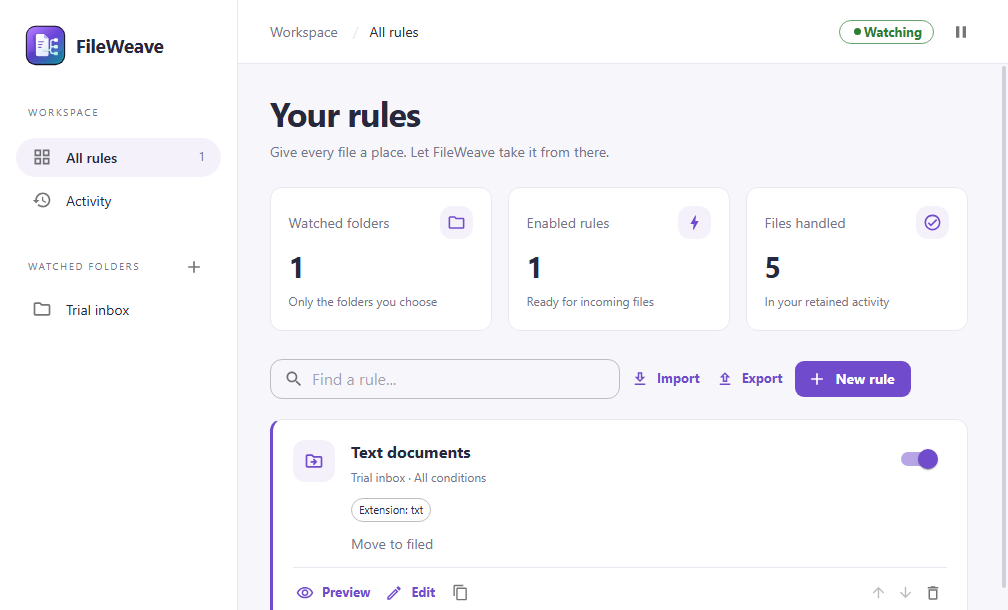
Watch. Match. File.
01
Watch
Choose the folders that receive your files. Watch only the top level, or include subfolders deliberately.
02
Match
Use filenames, extensions, size, and age to describe what belongs where. Combine conditions and set the rule order.
03
File
Preview a manual run, then let enabled rules handle incoming files. Move, copy, rename, or use native Trash or Recycle Bin.
Close the window. Keep the routine.
Rules you can read
Choose watched folders, combine all or any matching conditions, and order your rules. Include subfolders only when you want to.
Quiet, not invisible
Close the window and keep working. FileWeave stays in the menu bar or system tray, with activity, pause controls, and optional hidden startup at login.
A setup you can carry
Export a versioned JSON rule bundle. Review folder paths when importing on another computer; imported rules stay disabled until you enable them.
Preview first. Keep your backups.
Destination collisions do not overwrite existing files. Symlinks, incomplete downloads, and directory-based documents are excluded. Automatic rules still make real filesystem changes; preview a rule before enabling it and retain backups of important files.
Activity records what happened, including errors and partial failures. Pause stops new automation; Quit stops FileWeave itself. Recovery exports and turning off login startup remain available even when a trial has expired.
Get FileWeave
A one-time purchase, with installer delivery and recovery through your secure purchase portal.
$9.99
One-time purchase
macOS / Apple Silicon; Windows 11 / x64. Applicable taxes are shown at checkout.
No card or purchase key needed to start. The trial begins when you start it online in the app and lasts 7 consecutive days. After that, activate a purchased key to continue. Reinstalling does not restart the trial.
Version 0.2.3. Installer downloads are included in your purchase. The same app is available to try for 7 days, then requires a purchased key. A paid key unlocks only this app. Online checks refresh its 30-day offline receipt; the purchase itself does not expire. This paid-license cache is not a trial extension. Existing keys and device allowances are unchanged.
After payment, Polar emails a secure route to your license key and downloads. Already own it? Find your purchases.
A note on your data.
File processing, rules, and activity stay local, with no telemetry or file-content uploads to Mantiqo. Trial and paid activation use product-specific device metadata, not filenames, watched paths, rules, or activity. Network folders and cloud-sync services use their own filesystem and transport.
Read the product privacy policyA few useful answers.
No. Closing the window leaves FileWeave running in the macOS menu bar or Windows system tray. Quit FileWeave stops the process and its rules. This is a logged-in application, not a separate daemon or a service that runs while you are logged out. Background work requires a valid trial or paid activation.
Yes, through the optional Launch at login setting. Startup is off by default and opens FileWeave without its settings window. If you move the app, turn login startup off and back on from its new location. Importing rules does not register login startup.
FileWeave 0.2.3 supports Apple Silicon Macs and Windows 11 x64 PCs. Intel Macs, Windows on Arm, and Linux are not included.
Yes. Preview the planned actions before a manual run. FileWeave does not overwrite an existing destination, skips symlinks and incomplete downloads, and processes regular files only. Directory-based documents such as RTFD are excluded. Review automatic rules carefully and keep backups; there is no automatic undo.
The versioned JSON bundle carries watched-folder and rule configuration, not activity history, processing history, login registrations, or licensing data. Review and remap paths for the destination computer, especially between macOS and Windows. Imported rules receive new identifiers and remain disabled.
No. Actions are move, copy, rename, and the operating system's Trash or Recycle Bin. There is no shell execution, permanent-delete action, OCR, Finder-tag matching, or archive extraction.
A trial starts only when requested online and lasts seven consecutive days. Reinstalling does not restart it. After expiry, a valid paid activation is required for new work, including background automation. Already admitted work can finish safely. Pause, Quit, Export rules for recovery, and Turn off login startup remain available.
One FileWeave-specific purchase key covers Mac and Windows on unlimited personal devices. It does not unlock other Mantiqo products. Download the installers and recover your key through Polar's normal email-code customer portal. Paid activation needs internet initially; the signed receipt supports up to 30 days offline.
Updates are installed manually using the files in your Polar purchase portal. Future major upgrades may be sold separately; this purchase does not promise lifetime access to every future major version.
More from Mantiqo.

RepoDeck
macOS / Windows / Linux
All your projects. A clearer perspective.
Bring local folders and GitHub repositories into one project command center. Go from a portfolio-wide view to a focused workspace, with Git changes, resources, guided actions, and runs close at hand.
Developer tools

Trails
iOS
Go about your day. Keep the journey.
An automatic trip journal for the routes that make up your life. Record walks, runs, rides, and drives, then revisit them through route maps, replays, and a picture of your everyday movement.
Life in motion

DropStash
macOS
A little space between here and there.
A floating shelf for the things you are moving. Gather files, folders, text, and links in one place, switch to your destination, and drag them out when you are ready.
Everyday utilities